Du willst aus deinen Unterhaltungen automatisch lustige Memes erstellen? Mit dem Meme Architekt geht das ganz einfach. Dieser Skill analysiert deinen Text, erkennt die passende Emotion und generiert ein Meme mit dem richtigen Template – direkt über die imgflip API.
Warum imgflip statt Meme-Generatoren von Hand?
| Feature | Meme Architect | Manuelles Erstellen |
|---|---|---|
| Automatisierung | ✅ Voll automatisch | ❌ Zeitaufwändig |
| Emotions-Erkennung | ✅ Automatisch | ❌ Manuell entscheiden |
| Templates | ✅ 100+ verfügbar | ❌ Begrenzt |
| Integration | ✅ OpenClaw/CLI/API | ❌ Nur manuell |
Voraussetzungen
- Python 3.8+
- Pillow (optional, für Fallback)
- Kostenloser imgflip Account
Installation
Schritt 1: Virtual Environment erstellen (empfohlen)
python3 -m venv ~/openclaw-venv
source ~/openclaw-venv/bin/activate  # Linux/Mac
# oder: ~/openclaw-venv\Scripts\activate  # Windows
Schritt 2: Abhängigkeiten installieren
pip install PillowSchritt 3: imgflip Account erstellen
- Gehe zu imgflip.com/signup
- Erstelle einen kostenlosen Account
- Notiere Username und Passwort
Schritt 4: .env konfigurieren
Füge deiner .env folgendes hinzu:
IMGFLIP_USERNAME=DEIN_USERNAME_HIER_EINFUEGEN
IMGFLIP_PASSWORD=DEIN_PASSWORT_HIER_EINFUEGEN
Wichtig: Die .env Datei niemals committen! Sie ist bereits in .gitignore eingetragen.
Der Code: meme_architect.py
Erstelle die Datei scripts/meme_architect.py:
#!/usr/bin/env python3
"""
Context-Aware Meme Architect
Erstellt Memes basierend auf Gesprächskontext und Emotion
Nutzt imgflip API für echte Meme-Templates
"""

import os
import sys
import json
import subprocess
import urllib.request
import urllib.parse
from datetime import datetime
from pathlib import Path

# imgflip API Konfiguration aus .env
IMGFLIP_USERNAME = os.environ.get("IMGFLIP_USERNAME", "")
IMGFLIP_PASSWORD = os.environ.get("IMGFLIP_PASSWORD", "")

# Template ID Mapping (imgflip Template IDs)
IMGFLIP_TEMPLATES = {
    "success_kid": 61544,
    "distracted_boyfriend": 112126428,
    "two_buttons": 87743020,
    "drake_pointing": 181913649,
    "this_is_fine": 55311130,
    "crying_wolverine": 91538330,
}

# Emotions-Mapping zu Templates
EMOTION_TEMPLATES = {
    "success": {
        "template": "success_kid",
        "default_top": "Endlich...",
        "default_bottom": "Es funktioniert!",
    },
    "frustration": {
        "template": "this_is_fine",
        "default_top": "Alles läuft",
        "default_bottom": "(nicht)",
    },
    "irony": {
        "template": "distracted_boyfriend",
        "default_top": "Ich: Nur noch ein kleiner Fix",
        "default_bottom": "Auch ich: *baut 47 Skills*",
    },
}

# Trigger-Wörter für Emotionserkennung
EMOTION_TRIGGERS = {
    "success": ["funktioniert", "geschafft", "endlich", "läuft"],
    "frustration": ["down", "fehler", "nicht", "kaputt"],
    "irony": ["toll", "super", "perfekt"],
}

def analyze_emotion(text):
    """Analysiert den Text und bestimmt die Emotion"""
    text_lower = text.lower()

    emotion_scores = {}
    for emotion, triggers in EMOTION_TRIGGERS.items():
        score = sum(1 for trigger in triggers if trigger in text_lower)
        if score > 0:
            emotion_scores[emotion] = score

    if emotion_scores:
        return max(emotion_scores, key=emotion_scores.get)

    return "irony"

def create_imgflip_meme(template_id, text_top, text_bottom, output_path):
    """Erstellt ein Meme über die imgflip API mit curl"""

    if not IMGFLIP_USERNAME or not IMGFLIP_PASSWORD:
        print("Keine imgflip Credentials in .env gefunden!")
        return None

    cmd = [
        "curl", "-s", "-X", "POST",
        "https://api.imgflip.com/caption_image",
        "-d", f"template_id={template_id}",
        "-d", f"username={IMGFLIP_USERNAME}",
        "-d", f"password={IMGFLIP_PASSWORD}",
        "-d", f"text0={text_top}",
        "-d", f"text1={text_bottom}"
    ]

    try:
        result = subprocess.run(cmd, capture_output=True, text=True, timeout=30)
        data = json.loads(result.stdout)

        if data.get("success"):
            image_url = data["data"]["url"]
            urllib.request.urlretrieve(image_url, output_path)
            print(f"Meme erstellt: {image_url}")
            return output_path
        else:
            print(f"Fehler: {data.get('error_message', 'Unbekannt')}")
            return None

    except Exception as e:
        print(f"Fehler bei imgflip API: {e}")
        return None

def create_context_meme(context, emotion=None, output_path=None):
    """Hauptfunktion: Erstellt Meme aus Kontext"""

    OUTPUT_DIR = Path("/tmp/meme_architect")
    OUTPUT_DIR.mkdir(parents=True, exist_ok=True)

    if output_path is None:
        timestamp = datetime.now().strftime("%Y%m%d_%H%M%S")
        output_path = OUTPUT_DIR / f"meme_{timestamp}.png"

    if emotion is None:
        emotion = analyze_emotion(context)

    print(f"Erkannte Emotion: {emotion}")

    template_info = EMOTION_TEMPLATES.get(emotion, EMOTION_TEMPLATES["irony"])
    text_top = template_info['default_top']
    text_bottom = template_info['default_bottom']

    print(f"Oberer Text: {text_top}")
    print(f"Unterer Text: {text_bottom}")

    template_key = template_info['template']
    template_id = IMGFLIP_TEMPLATES.get(template_key, 61544)

    result = create_imgflip_meme(template_id, text_top, text_bottom, output_path)

    if result:
        print(f"Gespeichert unter: {result}")
        return str(result)
    else:
        return None

if __name__ == "__main__":
    if len(sys.argv) < 2:
        print("Nutzung: python3 meme_architect.py 'Dein Text hier'")
        sys.exit(1)

    create_context_meme(sys.argv[1])
Nutzung
CLI (Kommandozeile)
# Einzelnes Meme erstellen
python3 scripts/meme_architect.py "Mein Code kompiliert endlich"

# Mit spezifischer Emotion
python3 scripts/meme_architect.py "Pollinations ist down" --emotion irony

# Alle Templates anzeigen
python3 scripts/meme_architect.py --list
Python API
from scripts.meme_architect import create_context_meme

result = create_context_meme(
    context="Endlich läuft der Cron-Job nach 3 Tagen",
    emotion="success"
)

print(f"Meme erstellt: {result}")
# Output: /tmp/meme_architect/meme_20260410_094838.png
Unterstützte Emotionen und Templates
| Emotion | Template | Best für |
|---|---|---|
| success | Success Kid | Erfolge, kleine Siege |
| frustration | This Is Fine | Katastrophe ignorieren |
| dilemma | Two Buttons | Schwierige Entscheidungen |
| superiority | Drake Pointing | Ablehnung vs. Akzeptanz |
| irony | Distracted Boyfriend | Ablenkung, neue Ideen |
| nostalgia | Crying Wolverine | Nostalgie, Melancholie |
Beispiel-Ausgabe
Erkannte Emotion: irony
Oberer Text: Manuell arbeiten
Unterer Text: Automatisieren wie ein Boss
Meme erstellt: https://i.imgflip.com/aou2sd.jpg
Gespeichert unter: /tmp/meme_architect/meme_20260410_094838.png
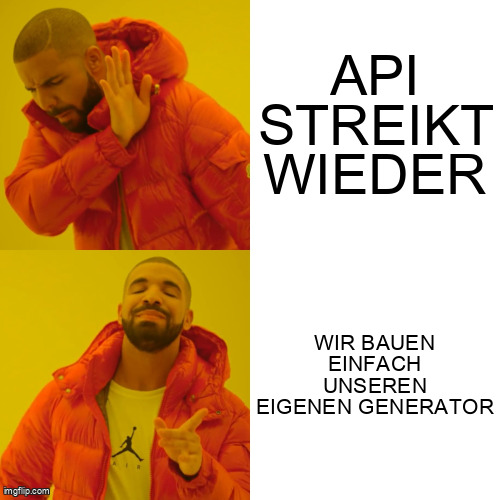
Beispiel-Meme
Hier ist ein mit dem Skill erstelltes Meme:
GitHub Repository
Der komplette Code ist Open Source:
https://github.com/James-Butler2026/openclaw-skills/tree/main/meme-architekt
Fazit
Mit dem Context-Aware Meme Architect verwandelst du jede Unterhaltung automatisch in einen viralen Meme-Moment. Die Emotionserkennung wählt das passende Template, die imgflip API generiert das Bild – und du bekommst den direkten Link zum Teilen.
Perfekt für:
- Discord/Slack Communities
- Twitter/X Posts
- Gruppenchats
- Jeden Moment, der meme-würdig ist
Viel Spaß beim Memen!